> ## Documentation Index
> Fetch the complete documentation index at: https://langtail.com/docs/llms.txt
> Use this file to discover all available pages before exploring further.
# Tools
> Use Tools to test if your functions and external APIs are used correctly
 ### Working with Tools
In Langtail, the Tools feature allows you to integrate external functions or APIs into your language model's workflow. This powerful capability enables you to create more sophisticated and context-aware applications by leveraging external data sources or services.
### Getting Started with Tools
To get started with Tools in Langtail, follow these steps:
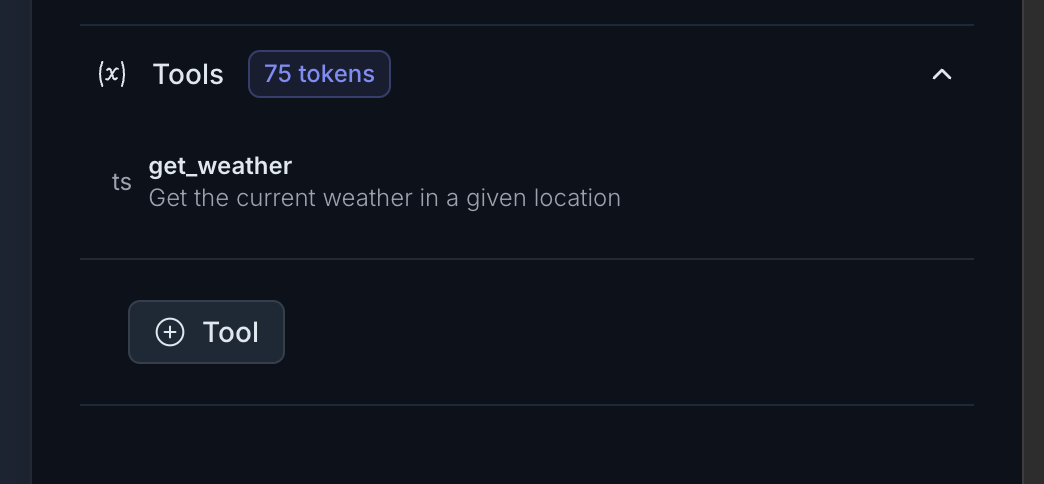
In the bottom-left corner of the Langtail interface, you'll find a button to enable the Tools panel. Click on it, and the Tools panel will appear on the right side of the screen.
Click on the "Plus Tool" button to add a new tool to your project.
In Langtail, you can create tools manually by providing a name, description, and specifying the required parameters in a structured format.
Alternatively, you can describe the tool's functionality in plain text, and Langtail can generate the tool function structure for you using its AI capabilities.
Once you've added a tool, you can test it by providing sample user inputs. Langtail will evaluate the input and determine if the correct tool function should be called based on your prompt.
Langtail supports custom API integration through a feature called Hosted Functions, allowing you to test your tools right inside Langtail by directly calling external APIs.
### Example: Using the Weather Tool with external API
Let's explore how to use the `get_weather` tool in Langtail with external [open weather API](https://openweathermap.org/api):
In the Tools panel, click on the "Plus Tool" button and manually create the `get_weather` tool function using the structure provided below. This is the definiton part.
```json theme={null}
{
"name": "get_weather",
"parameters": {
"type": "object",
"required": [
"location"
],
"properties": {
"unit": {
"enum": [
"celsius",
"fahrenheit"
],
"type": "string",
"default": "celsius",
"description": "The unit of temperature"
},
"location": {
"type": "string",
"description": "The city and state, e.g. San Francisco, CA"
}
}
}, "description": "Get the current weather in a given location"
}
```
Now lets add this to the handler part of the tool. Don't forget to user your API key from the open weather.
```json theme={null}
export default execute(async (args, context) => {
const apiKey = 'd5d0be4cb42f683ef45a0e6b20bff763';
const city = args.location
const url = `https://api.openweathermap.org/data/2.5/weather?q=${city}&appid=${apiKey}&units=metric`;
const response = await fetch(url);
const data = await response.json();
return JSON.stringify(data)
})
```
You can also use help of our magic button to generate a handler part of the tool. Just click the ✨ icon in the top right corner.
In the input field, enter a query related to weather, such as "What should I wear today in San Francisco, CA?"
Langtail will analyze the input and determine if the `get_weather` tool should be called based on your prompt. If the evaluation is successful, you'll see the tool function call displayed in the output, along with the correct response.
By using Tools in Langtail, you can create more powerful and context-aware language models that can leverage external data sources and services.
### Working with Tools
In Langtail, the Tools feature allows you to integrate external functions or APIs into your language model's workflow. This powerful capability enables you to create more sophisticated and context-aware applications by leveraging external data sources or services.
### Getting Started with Tools
To get started with Tools in Langtail, follow these steps:
In the bottom-left corner of the Langtail interface, you'll find a button to enable the Tools panel. Click on it, and the Tools panel will appear on the right side of the screen.
Click on the "Plus Tool" button to add a new tool to your project.
In Langtail, you can create tools manually by providing a name, description, and specifying the required parameters in a structured format.
Alternatively, you can describe the tool's functionality in plain text, and Langtail can generate the tool function structure for you using its AI capabilities.
Once you've added a tool, you can test it by providing sample user inputs. Langtail will evaluate the input and determine if the correct tool function should be called based on your prompt.
Langtail supports custom API integration through a feature called Hosted Functions, allowing you to test your tools right inside Langtail by directly calling external APIs.
### Example: Using the Weather Tool with external API
Let's explore how to use the `get_weather` tool in Langtail with external [open weather API](https://openweathermap.org/api):
In the Tools panel, click on the "Plus Tool" button and manually create the `get_weather` tool function using the structure provided below. This is the definiton part.
```json theme={null}
{
"name": "get_weather",
"parameters": {
"type": "object",
"required": [
"location"
],
"properties": {
"unit": {
"enum": [
"celsius",
"fahrenheit"
],
"type": "string",
"default": "celsius",
"description": "The unit of temperature"
},
"location": {
"type": "string",
"description": "The city and state, e.g. San Francisco, CA"
}
}
}, "description": "Get the current weather in a given location"
}
```
Now lets add this to the handler part of the tool. Don't forget to user your API key from the open weather.
```json theme={null}
export default execute(async (args, context) => {
const apiKey = 'd5d0be4cb42f683ef45a0e6b20bff763';
const city = args.location
const url = `https://api.openweathermap.org/data/2.5/weather?q=${city}&appid=${apiKey}&units=metric`;
const response = await fetch(url);
const data = await response.json();
return JSON.stringify(data)
})
```
You can also use help of our magic button to generate a handler part of the tool. Just click the ✨ icon in the top right corner.
In the input field, enter a query related to weather, such as "What should I wear today in San Francisco, CA?"
Langtail will analyze the input and determine if the `get_weather` tool should be called based on your prompt. If the evaluation is successful, you'll see the tool function call displayed in the output, along with the correct response.
By using Tools in Langtail, you can create more powerful and context-aware language models that can leverage external data sources and services.